
Guides › Rough Cut
How to remove silence in Premiere Pro automatically
You do not have to find every pause by eye. Premiere can list the pauses in a talking clip and delete them in one go, and a plugin can go further and catch the ums and the sentences you said twice. Both ways are below.
The short answer
- Built in: Text panel › Transcribe › filter for Pauses › Delete. Works on any sequence with speech.
- What it misses: repeated takes, and pauses you wanted to keep. You still check the result by ear.
- With a plugin: a list of every cut before anything is removed, so you decide first.
Way 1: Premiere's own text-based editing
This needs a recent version of Premiere. The transcript has to be made from the sequence, not from the source clip.
- Open the Text panel. Choose Window › Text and go to the Transcript tab.
- Transcribe the sequence. Press Transcribe and wait for the text. Pauses show up in the transcript as gaps marked between the words.
- Filter for pauses. Press the filter button in the Transcript tab and choose Pauses. Every pause is highlighted. Choose Filler words in the same menu to find the ums and uhs.
- Set what counts as a pause. In the transcript's options you can set the shortest gap that counts, so breaths between words are left alone.
- Delete. Press Delete and choose Extract, which removes the pause and closes the gap. Lift removes it and leaves a hole. Delete all does every one at once.
- Listen through. Play the result. Put back any pause that was there on purpose with Undo, or trim it by hand.
Way 2: check first, then cut, with Glide
Glide is a panel that sits inside Premiere. Its Rough Cut tab listens to the voice on your own computer, finds the pauses, the ums and the words said twice, and shows you the list before it touches the timeline.
- Pick the voice track. The track with the talking. Music on other tracks is left alone.
- Press Find cuts. Glide listens and lists every cut it would make.
- Check, then cut. Flip any cut to Keep, hear it, then cut. You can cut on a copy of the sequence, so the original stays as it was.
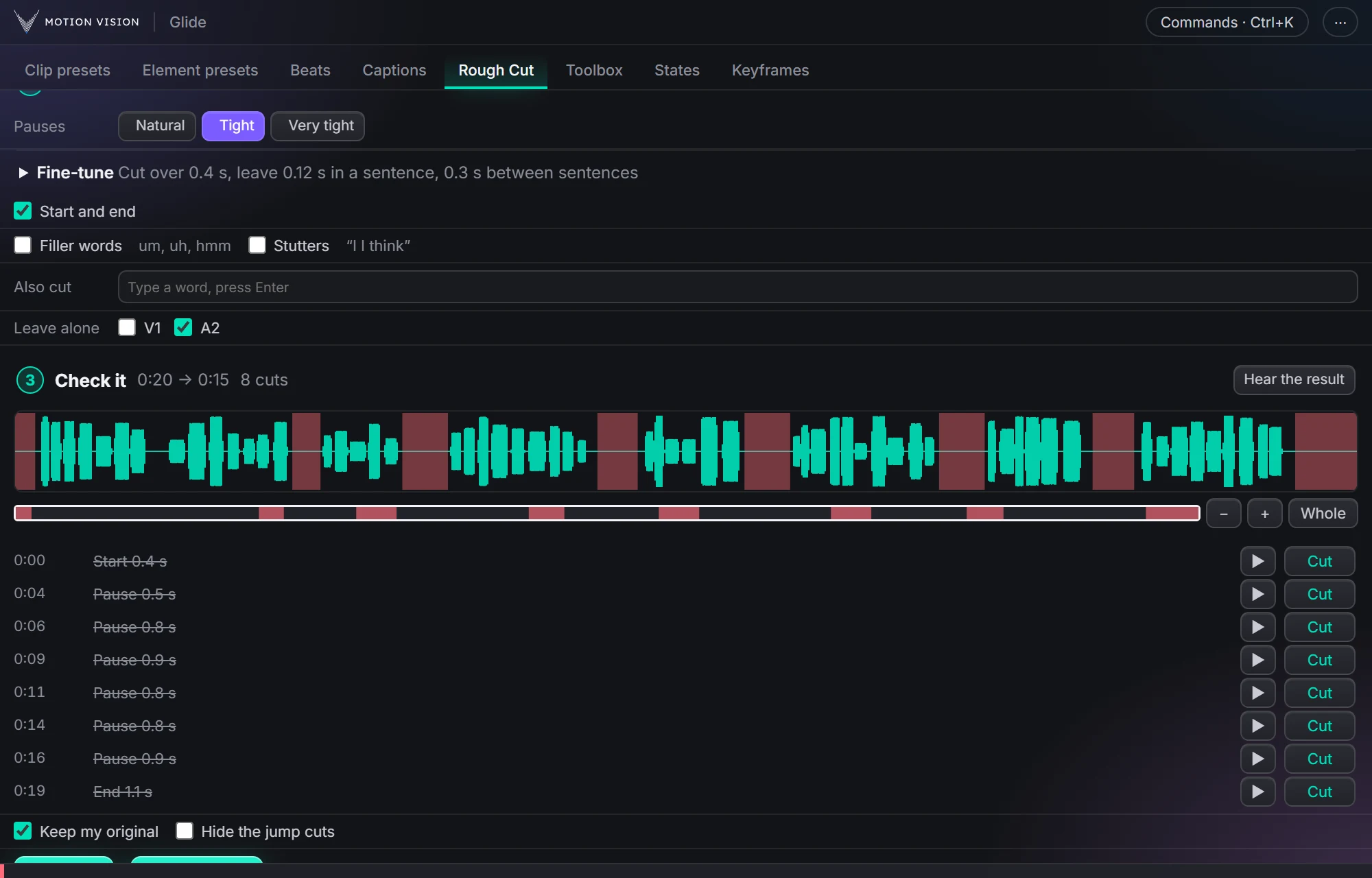
Try Rough Cut on a sample talk.
Glide's own cut rules, running on this page. Change the pace or the numbers and see exactly what it would cut.
Questions
Can Premiere Pro remove silence without a plugin?
Yes. Transcribe the sequence in the Text panel, filter for Pauses and delete them. It is built into recent versions.
Can Premiere remove filler words like um and uh?
Yes, with the same filter set to Filler words. It catches most of them, not all, so listen through afterwards.
What about sentences I said twice?
Premiere's pause filter does not look for repeats. Glide's Rough Cut lists the words said twice next to the pauses and the ums, and you choose which to cut.
Will the cuts touch my music?
In Glide you pick the voice track, and music on other tracks is left alone. With Premiere's own Extract, check which tracks are targeted before you delete.
Can I undo it?
Yes. Premiere's Undo takes it back, and Glide can make the cuts on a copy of your sequence.
Get Glide
Glide works in Premiere 2022 or newer, on Windows and on a Mac. You pay once.
Buy Glide · $39 Everything Rough Cut does
More guides: Add animated captions · Make a smooth zoom